
A homepage that converts visitors is one that moves a stranger from curiosity to contact in under 60 seconds. For local service businesses in Perth, Fremantle, and Melville, your homepage is not a digital brochure. It is your top salesperson, working around the clock. Conversion rate optimization (CRO) is the recognized industry term for this discipline, and it focuses on extracting more leads from the traffic you already have rather than simply chasing more clicks. The average website conversion rate sits between 1% and 5%, which means most homepages are quietly losing 95 out of every 100 visitors.
What are the key elements of an effective homepage layout for conversions?
The layout of your homepage is the single biggest lever you control. Get it wrong and even great SEO traffic disappears without a trace.
Above the fold: your first and best chance
Content above the fold attracts 84% more attention than anything below it. That number should reset how you think about your homepage. Most local service businesses bury their offer, their phone number, and their call to action (CTA) halfway down the page. Visitors never get there. Placing benefit-driven text and a high-contrast CTA above the fold can lift conversions by up to 20% compared to image-heavy designs that say nothing useful.

The F-pattern is the natural scanning path most visitors follow. Their eyes move left to right across the top, then drop and scan left again. Your headline, subheadline, and CTA button need to sit directly in that path. A plumber in Fremantle who leads with “Emergency Plumbing in Fremantle. Call Now.” will outperform one who opens with a stock photo of pipes and a tagline about “quality service.”
The CTA and visual hierarchy
Strong CTAs share three traits: they are specific, they use high-contrast color, and they appear more than once on the page. “Get a Free Quote” outperforms “Contact Us” because it names the benefit. Button color matters too. A CTA that blends into your background is invisible. Use a color that appears nowhere else on the page.
Pro Tip: Place your primary CTA button in the top navigation bar as well as above the fold. Visitors who scroll back up to find your contact details are already interested. Make it effortless for them.
Key layout elements every converting homepage needs:
- A clear headline that states what you do and who you serve, in plain language
- A subheadline that names the primary benefit or outcome you deliver
- A high-contrast CTA button above the fold with specific copy
- A phone number visible in the header on both desktop and mobile
- A supporting image that shows real people or real results, not stock photos
- Trust signals placed directly beside or below the CTA
For more on homepage layout strategies built specifically for local service businesses, the principles above apply across trades, health services, and professional firms alike.
How does website speed affect homepage conversions?
Speed is not a technical detail. It is a conversion factor with a direct dollar value attached to it.
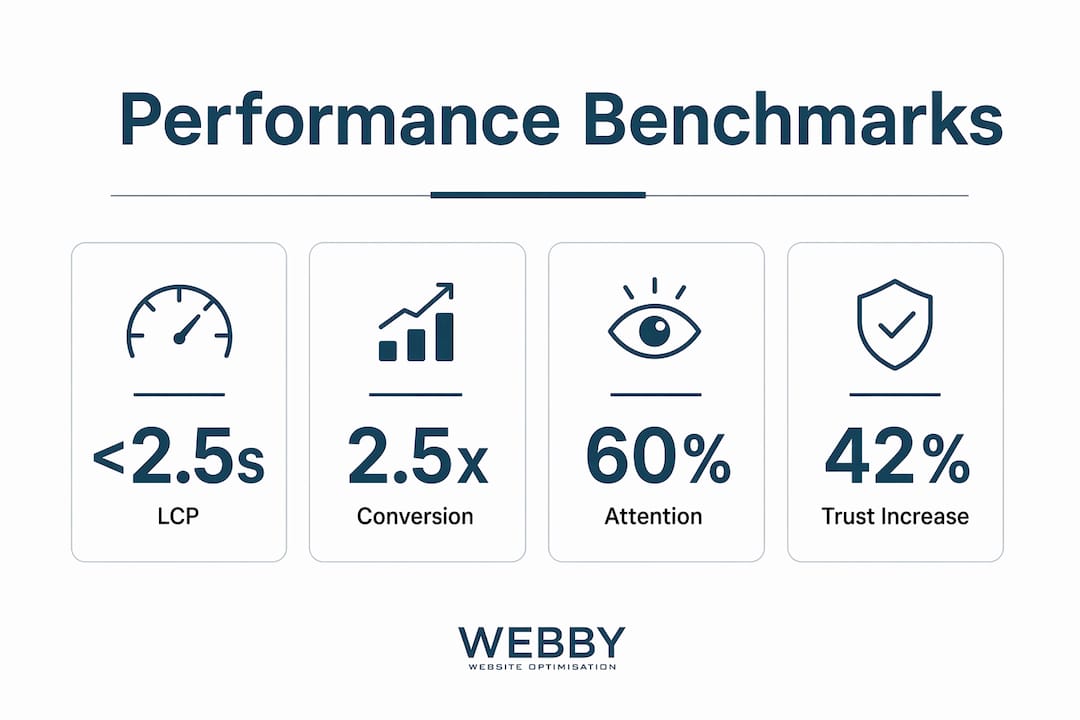
Pages loading in 1 second convert 2.5 times better than pages that take 5 seconds to load. That gap is enormous for a local service business competing against larger operators. Even smaller gains matter. A 100ms improvement in load time increases conversion by 1.11%. That sounds small until you multiply it across hundreds of monthly visitors.
Performance benchmarks that matter
Two metrics define fast for Google and for your visitors:
| Metric | Target | Impact if Missed |
|---|---|---|
| Largest Contentful Paint (LCP) | Under 2.5 seconds | Visitors perceive the page as broken or slow |
| Time To First Byte (TTFB) | Under 800ms | Search rankings drop; first impression suffers |
Local service websites commonly fail on speed for three reasons: uncompressed images, cheap shared hosting, and bloated WordPress themes loaded with unused plugins. Each one is fixable without rebuilding your site from scratch.
Pro Tip: Run your homepage through Google PageSpeed Insights before spending a dollar on ads. If your mobile score is below 70, fix the speed first. Ad spend on a slow page is money wasted.
The benefits of site speed optimization extend beyond conversions. Faster pages rank higher in Google search results, which compounds the return on every technical improvement you make.
What role does trust play in local service homepage design?
Trust is the invisible barrier between a visitor and a lead. Remove it and conversions follow.
Trust signals near CTAs can increase conversion rates by up to 42%. That is not a marginal gain. For a local electrician or cleaning service, placing a Google review rating directly beside the “Book Now” button can be the difference between a phone call and a closed tab.
Where to place trust signals for maximum effect
Placement matters as much as presence. A testimonial buried at the bottom of the page does almost nothing. The same testimonial placed beside your primary CTA does a great deal. Here is how to structure trust architecture on a local service homepage:
- Google rating badge: Place it in the header or directly below the headline. Visitors recognize it instantly.
- Client logos or partner badges: Position these in a horizontal strip below the fold. They signal credibility without demanding attention.
- Short testimonials: Use one or two directly beside your main CTA. Keep them under 30 words each. Specificity beats length every time.
- Certifications and licenses: Display these near the footer or on a dedicated trust bar. Trades businesses benefit especially from showing licensing numbers.
- Before-and-after photos or project images: These work harder than any written testimonial for visual trades like landscaping, painting, or renovation.
Understanding why website design affects trust goes deeper than adding logos. The overall visual quality of your site signals professionalism before a visitor reads a single word. A poorly designed page undermines every trust signal you place on it.
The homepage is the critical funnel point that guides visitors deeper into your site. Trust signals are what make visitors willing to take that next step rather than retreating to Google to find your competitor.
What are practical steps to optimize your homepage for higher conversions?
Optimization is a process, not a one-time event. These steps give you a clear sequence to follow.
Step 1: Define your conversion goal. Most local service homepages need one primary action: a phone call, a form submission, or a booking. Pick one. Homepages that ask visitors to do three things at once get none of them done.
Step 2: Write a benefit-driven headline. Headline changes alone can increase conversions by 20–40%. Test two versions: one that names your service and location, and one that names the outcome you deliver. “Blocked Drain Fixed Today in Melville” beats “Professional Plumbing Services” every time.
Step 3: Cut your contact form down. Reducing form fields from 11 to 4 can increase conversions by 120%. Ask for name, phone, service type, and preferred time. Collect everything else after the lead is in. Progressive profiling, the practice of gathering additional information across multiple interactions, lets you build a complete picture without overwhelming visitors on the first visit.
Step 4: Run A/B tests on your headline and CTA. Human intuition fails to predict user behavior roughly 50% of the time. What you think will work often does not. Tools like Google Optimize or VWO let you test two versions of a page simultaneously and let data decide the winner. Start with your headline. It is the highest-impact element on the page.
Step 5: Personalize for your traffic source. Tailored landing pages convert 2–3 times better than generic ones. If you run Google Ads for “emergency electrician Perth,” the page those visitors land on should say exactly that. A generic homepage wastes paid traffic.
Step 6: Use session replay tools. Session replay analysis uncovers friction points that aggregate data misses entirely. Tools like Inspectlet or Hotjar show you exactly where visitors stop scrolling, where they click in frustration, and where they abandon your form. Fix what you see, then test again.
For a deeper look at online lead generation strategies built for local service businesses, the principles in these steps apply directly to how your homepage feeds your broader sales funnel.
Pro Tip: Before testing anything, fix your fundamentals. Core fundamentals like clarity, speed, and friction reduction must come before minor design tweaks. A beautiful A/B test on a slow, confusing page will still fail.
Key takeaways
A homepage that converts visitors requires clear above-the-fold messaging, fast load times, strategic trust signals, and continuous testing to turn local traffic into real leads.
| Point | Details |
|---|---|
| Above-the-fold clarity | Place your headline, benefit statement, and CTA above the fold to capture 84% more visitor attention. |
| Speed is a conversion factor | Pages loading in 1 second convert 2.5x better than those taking 5 seconds. Fix speed before running ads. |
| Trust signals near CTAs | Placing Google ratings and testimonials beside your CTA can lift conversions by up to 42%. |
| Shorter forms convert more | Cutting form fields from 11 to 4 can increase form completions by 120%. Ask only what you need. |
| Test before you assume | Intuition fails to predict user behavior about 50% of the time. Use A/B testing and session replays to decide. |
What i’ve learned after watching hundreds of local homepages fail
Most local service business owners I work with share the same belief: if the site looks good, it will convert. That belief costs them leads every single month.
The sites that actually convert are rarely the prettiest ones. They are the clearest ones. A homepage that tells a visitor exactly what you do, exactly who you serve, and exactly what to do next will outperform a visually impressive page with vague copy every time. I have seen a plain WordPress site with a direct headline and a visible phone number outperform a custom-designed site that cost five times more to build.
The second mistake I see constantly is treating optimization as a launch-day task. Owners redesign their site, feel satisfied, and move on. Conversion work never stops. The businesses generating consistent leads from their homepages are the ones running tests, reading session replays, and adjusting copy based on what visitors actually do, not what the owner thinks they should do.
The third pitfall is chasing traffic before fixing the page. Spending on Google Ads or SEO while your homepage loads in 6 seconds and buries the phone number is like filling a bucket with a hole in it. Fix the conversion fundamentals first. The traffic you already have is worth far more than you are currently getting from it.
— Steve Doig
How webby website optimisation can help you convert more visitors
If you recognize your homepage in any of the problems described above, you are not alone. Most local service websites in Perth, Fremantle, and Melville were built to look professional, not to generate leads.
Webby Website Optimisation specializes in high-converting website design for local service businesses. The team handles everything from above-the-fold layout and CTA placement to speed optimization, trust signal architecture, and A/B testing. The goal is always the same: more leads from the traffic you already have. If your homepage is not working as hard as it should, a free audit from Webby Website Optimisation is the fastest way to find out why. Contact the team today and get a clear picture of what your homepage is costing you.
FAQ
What is a good conversion rate for a local service homepage?
The average website conversion rate sits between 1% and 5%. Local service businesses with optimized homepages, fast load times, and clear CTAs regularly achieve rates at the higher end of that range.
How many ctas should a homepage have?
One primary CTA is the standard recommendation, repeated in the header, above the fold, and at least once further down the page. Multiple competing CTAs confuse visitors and reduce overall conversions.
Does mobile design affect homepage conversion rates?
Mobile performance directly affects conversions. A slow or poorly formatted mobile page loses visitors before they read a single word, since most local search traffic arrives on a smartphone.
How do i know if my homepage is losing leads?
Session replay tools like Hotjar or Inspectlet show exactly where visitors drop off, stop scrolling, or abandon your contact form. Google Analytics goal tracking confirms whether visitors are completing your intended conversion action.
How often should i update or test my homepage?
Run at least one A/B test per month on your highest-traffic page element, starting with your headline. Continuous testing is what separates homepages that improve over time from those that stagnate.